
- Home ›
- JpGraphを使ったグラフの描画 ›
- JpGraphの使い方 ›
- HERE
軸ラベルのフォントの設定
広告
グラフの軸に表示されているラベルのフォントを設定します。フォントの設定にはAxisクラスで用意されている「SetFont」メソッドを使います。
SetFont
function SetFont($aFamily,$aStyle,$aSize)
Set the font for labels on the axis

Parameter:
  $aFamily  Font family
  $aStyle  Font style(Default FS_NORMAL)
  $aSize  Font size(Default 10)
「SetFont」メソッドを使ったフォントの指定方法については『JpGraphにおけるフォントの指定方法』を参照して下さい。
例えば次のように指定します。
include ("jpgraph/jpgraph.php");

$graph = new Graph(250, 200);

$graph->xaxis->SetFont(FF_TIMES, FS_ITALIC, 16);

$graph->Stroke();
サンプル
それでは実際に試してみます。
<?php

include ("jpgraph/jpgraph.php");
include ("jpgraph/jpgraph_bar.php");

$data1y=array(-8,8,9,3,5,6);
$data2y=array(18,2,1,7,5,4);

$graph = new Graph(250,200,"auto");
$graph->SetFrame(true);
$graph->SetScale("textlin");

$graph->title->Set("Title");

$graph->xaxis->SetFont(FF_TIMES, FS_ITALIC, 16);
$graph->yaxis->SetFont(FF_ARIAL, FS_BOLD, 12);

$graph->img->SetMargin(50,30,30,30);

$b1plot = new BarPlot($data1y);
$b1plot->SetFillColor("orange");
$b1plot->value->Show();
$b2plot = new BarPlot($data2y);
$b2plot->SetFillColor("blue");
$b2plot->value->Show();

$gbplot = new AccBarPlot(array($b1plot,$b2plot));

$graph->Add($gbplot);

$graph->Stroke();
?>
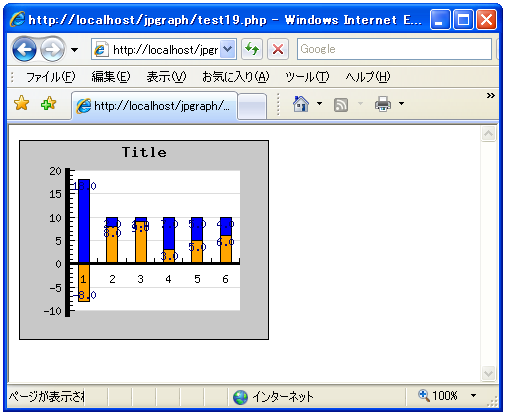
上記のPHPファイルをブラウザで開いてみます。ブラウザには次のように表示されます。
( Written by Tatsuo Ikura )
 PHPBook